
Image SEO 2022:
Explained Simply and Easily Implementable!

Klaus Huber
20.09, 2022
What is Image SEO?
Image SEO involves measures to improve the discoverability of images on a website in the Google index and to be found at the top of Google Image Search results.

Why is Image SEO the most important sales factor for certain industries?
This mainly applies to products rather than services. It pertains to products and offerings that are evaluated and purchased based on their appearance. Products like fashion items, cars, etc., fall into this category.
How does Image SEO work, and how can you implement it yourself?
Firstly, Image SEO follows the same principles as general SEO. Content that provides the most benefit to users will achieve greater visibility and will be displayed more frequently by Google.
Therefore, when using images, consider the goal you want to achieve and the benefits users can derive from each image.
Also, check if there are many images displayed in the direct search results for the search intent of the landing page where the image is located. This happens when Google users are searching for something that is mainly purchased based on visual criteria. For example, fashion items are usually bought based on visual criteria. However, when purchasing a front door, most searchers will prefer a door that matches or "looks good" with their house, and Google can recognize this, displaying relevant images directly in the search results.
One example is the search for a "wedding dress in princess style".
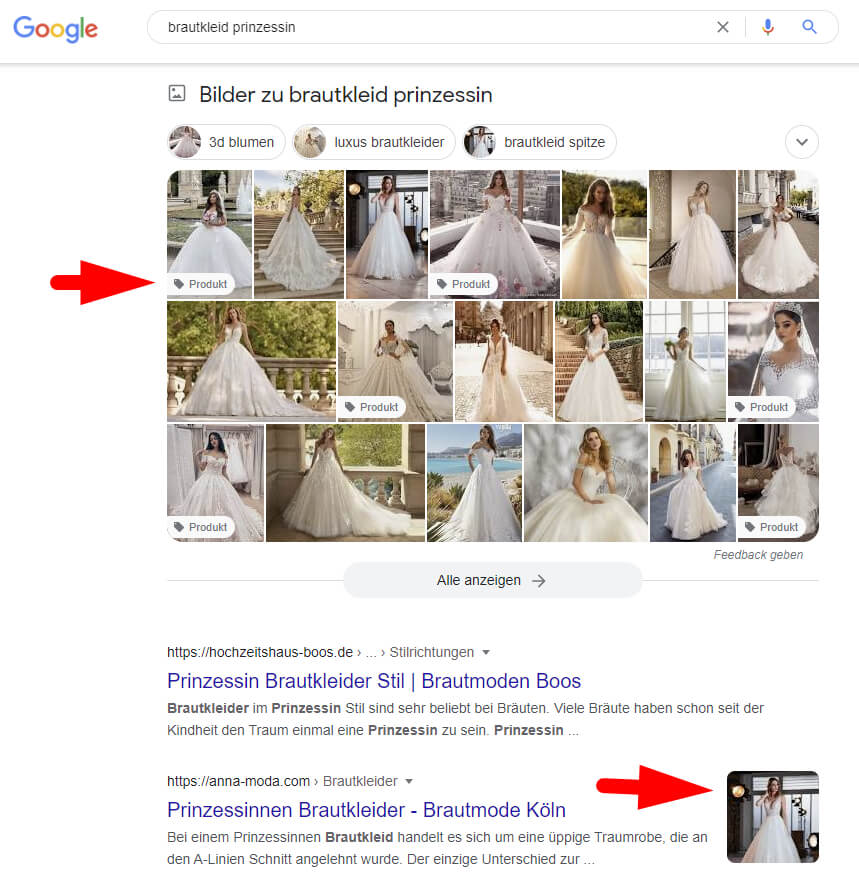
Since Google often cannot identify exactly what is shown in the image, it is essential to name your images descriptively. In the previous example, one way to name the image would be "white-wedding-dress-princess-style-MAXXcompany-product-number".
Image ALT / "Alt Attribute":
The Alt attribute (also known as Alt text or alternative text) is only visible when the image fails to load, but Google uses this information! Use a concise form (long-tail keyword) to provide the best possible description of the image to help Google understand and categorize the image correctly. Caution! If you use a text that is unrelated to the image in an attempt to rank better, Google will quickly detect this. Such an approach can negatively impact your rankings. Although Google is working hard on improving image recognition, it will likely take several more years until Google can accurately categorize images without corresponding image descriptions.
TIP: Always focus on what the image actually shows and what you want to achieve with it. Therefore, try to include all relevant and possible search parameters in the Alt attribute.
Let's say you are selling white princess-style wedding dresses. You might have more than one variant of such a dress. In this case, it is allowed to use the same names, but it still makes sense to add refinements with universally valid product numbers or specific wedding dress features such as short, ruffled, modern, classic, plus-size, for slim figures, for pregnant women, etc. This way, you have the best chance of having your image displayed for long-tail keyword searches.
Image Title / "Title Attribute"
The Title attribute is visible when the cursor hovers over an image. It helps visually impaired or blind users understand the images, making it necessary for an accessible website. Similar to the Alt attribute, it is recommended to display only the most useful information for the reader since the text is visible. For example, an article number might not make much sense in this context.
Image Filename
Image filename, e.g., seo-image-name.jpg. Properly name your images. Do not save images with cryptic names like 232-20.05.2023-man.jpg, but use a name that Google can associate with the image. You can follow the text used for the Image ALT attribute here as well.
The Demand for the Best Image
Your images should represent the best visual result for the search term. "Best" refers to the largest portion of searchers for that search term since you cannot satisfy every searcher's preferences.
The Uniqueness Pays Off! Unique Images
Use images that are as unique as possible. Google prefers images that cannot be found on many other pages. This is comparable to duplicate content in texts. Copying and distributing texts or posts is "not supported" by Google in relation to ranking and can even lead to ranking demotion.
The Use of the Image and Its Connection to Your Landing Page
What headline, text, and image caption are placed above, below, and next to the image? Google also draws conclusions from this information regarding the display and use of the image in Google ranking and/or image search results.
The Position of the Image on a Web Page
In general, the higher an image is located on a page, the higher its priority is for Google. Different evaluations are given to images used, for example, as background images, icons, and other graphical embellishments of the webpage. When it comes to product images, Google also understands that the priority of displaying a product in position 1 or at the last position of product images is not necessarily based on the image's priority. Sensitivity is required when using them.
Image Size, Format, and Loading Time of Images
A small size of images means a fast loading time, which Google prefers as a principle. Of course, the loading time should be in proportion to the displayed image quality. Therefore, if it is important for the user to be able to see more details in the image or to view a larger image, you should prefer a file size in a "healthy" ratio. The rule is to be as small as necessary and as large as necessary. However, it should be kept in mind that images in the image search should not appear too pixelated. In professional circles, it is assumed that 300 pixels and an image format of 4:3 are preferred by Google in image search. As for the format (JPG, PNG, GIF, etc.), it only matters insofar as the chosen format can be displayed by popular browsers, and the format that enables the smallest image size (kb) with the best image quality should be preferred.
URL Structure of the Respective Image
Google also takes into account the folder structure of the URL. For example: www.wedding-fashion-website.com/bridal-dresses/princesses/white-princess-bridal-dress-marlon.jpg
Through the entire folder structure and images, Google sees the number of products in a category. The folder structure should reflect the search intentions/categories. For bridal fashion, for example, the color of the dress, the type such as princess, Soho, or vintage, and specific search parameters, such as whether the dress is suitable for pregnant or plus-size women.
Use Structured Data and IPTC Photo Metadata for Images
By using structured data, images are more easily associated with Google and can also be displayed by Google, for example, next to a search result, to present it even more prominently.
To learn how to apply these correctly, you can refer to Google's documentation directly at https://developers.google.com/search/docs/advanced/structured-data/how-to?hl=en
If you are also interested in embedding copyright information correctly, you can find detailed information on Google's guidelines at: https://developers.google.com/search/docs/advanced/structured-data/image-license-metadata?hl=en
Responsive Use and Display of Images
When using images on your website, consider the different resolutions of end devices such as smartphones, iPads, small notebooks, or large desktop monitors. Your images should be optimally displayed for each resolution on your website.
Optimizing through AB Testing
Test whether a different variant of the image can achieve more conversions, especially for products, categories, and other web pages. With Google Optimize or other testing tools, you can often achieve amazing improvements, which can have a significant impact on your sales.
How to Add Alt Texts to Images
If you are not using a CMS, you need to enter everything manually in the source code:
<img src="/image-file-name.jpg" alt="The text describing the image" title="The text shown when hovering over the image" />
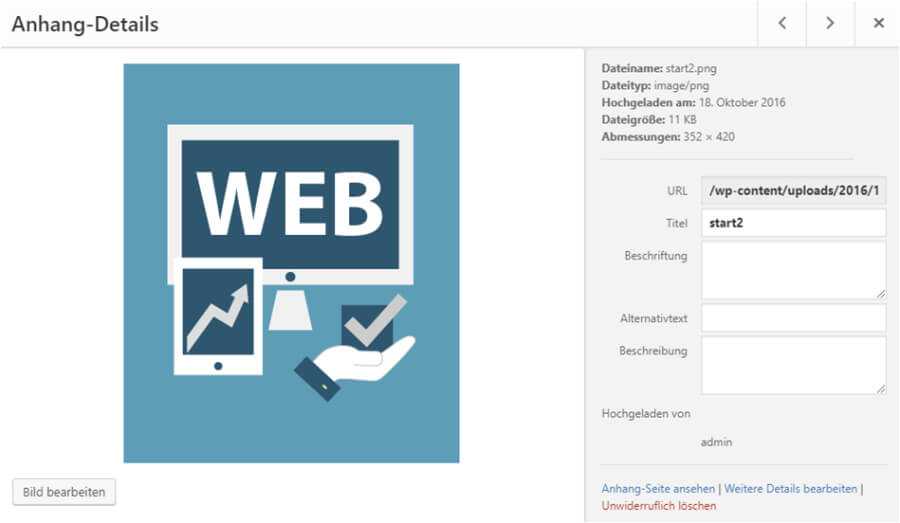
If you are using WordPress, for example, you can conveniently enter all the necessary image information during media upload. It is also possible when adding the image via the editor.
Keep an Eye on Your Competitors, Too!
It makes sense to regularly check if a competitor negatively influences your ranking with new, better images. Pay attention to this and counteract this issue by creating even better images for your content, products, etc.