
The Ultimate Meta-Description
for Your Website in 2022!

Klaus Huber
28th July, 2021
The Meta-Description is a short summary of the content on your website and is intended to encourage visitors to click on your offer. It is the first thing your users come across before they reach your page and can significantly increase your click-through rate.
To ensure that you make the perfect first impression, we have compiled the ultimate guide on writing the Meta-Description for you.
Meta-Description Definition
The Meta-Description briefly describes what users can expect on a webpage. It is inserted into the HTML code for static pages and is displayed by Google in the search engine results page below the title. Thus, the Meta-Description is part of the so-called Google Snippets.
The snippet is a preview text that appears in the search results. This snippet is extremely important because it is what drives Internet users to your website. However, for the user to click on it, they must immediately recognize that the content of the page will be beneficial to them.
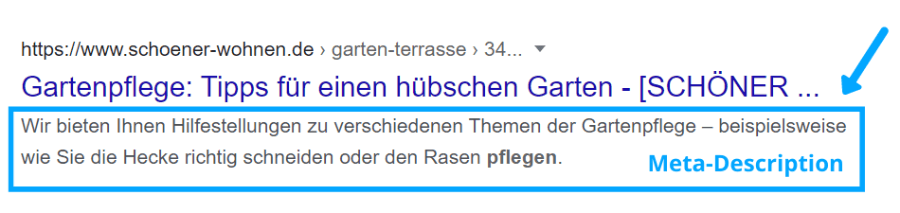
According to Google, the Meta-Description is not a direct ranking factor, but it is still an important part of search engine optimization. It can increase the click-through rate of the page because a well-written and optimized description can attract more users to click on the offer.
How to Create a Great Meta-Description
The Meta-Description should convey the core message of your website in one to two sentences and precisely describe what the user will find on the page. At the same time, the description must provide a compelling reason for the user to visit the page. This could be the solution to a specific problem or an irresistible offer.
For creating the ultimate Meta-Description, using the AIDA principle is beneficial. This approach has already proven successful in other marketing areas. The acronym AIDA stands for the four individual stages of a purchase: Attention, Interest, Desire, and Action.
With this marketing formula, you can specifically attract the attention of Internet users and encourage them to click on your ad.
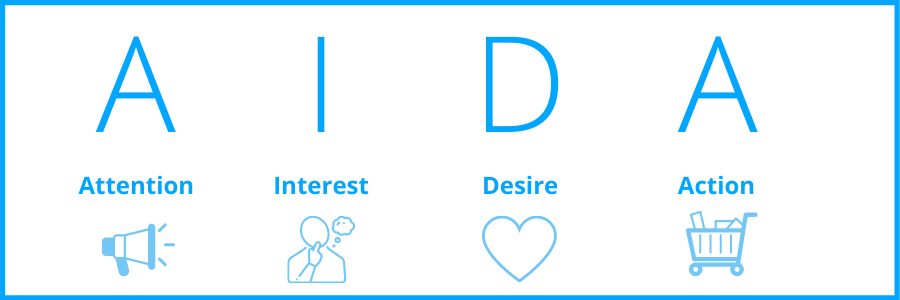
Now let's see how to apply this formula to your Meta-Description:
Attention
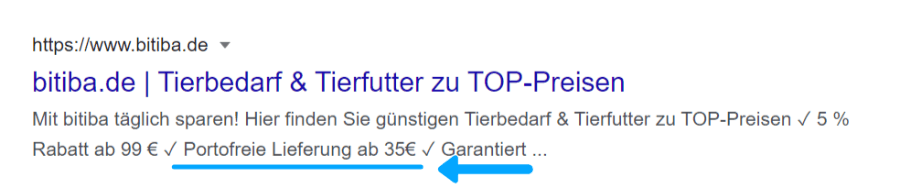
- In general, anything that stands out from plain text will grab the users' attention. Use special characters like hearts or emojis to make the description more interesting and create an eyecatcher. However, be cautious not to overuse special characters, as it can quickly make the text appear unprofessional.
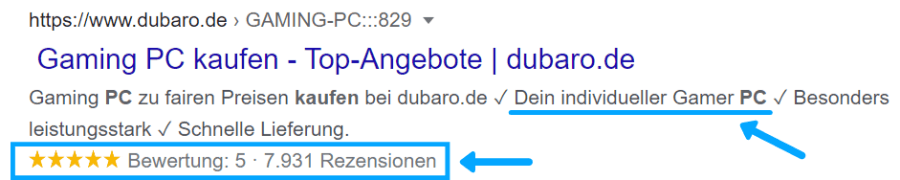
- Dates in square brackets or checkmarks work particularly well. They subconsciously signal approval to the reader. Additionally, the date emphasizes that the content of the page is up-to-date.
- Avoid using double quotation marks as they will be cut off in the description.
- Use words like "affordable" or "free". Discounts, coupons, or percentage-off deals also grab attention.

Interest
- It is essential to highlight your USPs (Unique Selling Points). These are the unique features of your offer. What makes your product/service special? How do you stand out from the competition?
- Another effective technique is to include Social Proof. We tend to perceive an offer more positively if many other people have already taken advantage of it. So, share how many happy customers you have served, how many satisfied guests you have hosted, or how many products you have sold in total. Customer reviews in the form of stars also work wonders in this context. The underlying idea is that if there are numerous positive reviews, the offer must be good.
Desire
- To create desire in the customer, emphasize the benefits and unique value of your offer. Make it clear in your Meta-Description that your page can fulfill the user's needs and provide the solution to their problem.
- It also works well to highlight the wide product selection, convenient delivery conditions, or exceptional service.
Action
- At the end of your description, you need to call the users to action. Insert clear Call-to-Actions (CTAs) like "Buy Now!", "Download Now!", or "Order Now!"
- Adapt the CTA to your industry. For hotels, you can use phrases like "Book Now!" or "Reserve Now!"
7 Pro Tips for the Meta-Description
During our many years of work, we have come across some factors that will undoubtedly help you with the successful creation of the Meta-Description. If you follow these simple principles, your description will undoubtedly be excellent.
1. Pay attention to the character count
The Meta-Description length should be between 140 and 155 characters (approximately 990 to 1300 pixels). If it's longer, Google will cut it off with three dots.
Make sure to include the most important information about your website in one to two sentences. However, don't make the description too short, or you'll waste valuable space.
TIP: Keep in mind that on mobile devices, the available character count shrinks to about 120 characters, and a preceding publication date also reduces the space.
2. Use your focus keyword
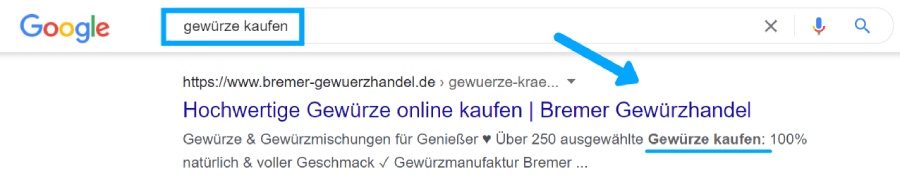
Ensure that your main keyword appears in the description. When someone searches for the term, Google will highlight the used keyword in bold, attracting additional attention.
3. Write in your company's style and tone
Every company has its own tone and brand voice. Your Meta-Description should also be aligned with it. Use specific phrases frequently in your description to establish a consistent linguistic style that your users will recognize.
4. Analyze your competitors' Meta-Descriptions
As in many areas of SEO, comprehensive competitor research is the key to success. Analyze the descriptions of your competitors and draw inspiration for your own phrasing. During this analysis, you can also determine the search intent of your users and orient your description accordingly.
5. Write uniquely
Each of your Meta-Descriptions should be uniquely formulated and not copied from other websites, as duplicate content can negatively affect rankings. Create a SEO Meta-Description for each of your subpages. Ideally, start with your strongest pages, those that generate the most traffic.
6. Write actively
Use an active voice and short sentences when formulating the Meta-Description. This makes it more dynamic and easy to read. Avoid cumbersome passive constructions and foreign words. Internet readers are usually very impatient. If they don't understand a description right away, they will quickly lose interest.
7. Ensure consistency between the page content and the description
Your users naturally don't want to be misled and expect to find exactly what the Meta-Description promises. Make sure your description matches the content of your webpage and avoid making false claims. Otherwise, visitors will bounce back immediately.
Rich Snippets
Rich Snippets are an enhanced version of regular Google Snippets. They are enriched with information such as dates, images, ratings, or prices. This provides users with more details about the website, helping them decide whether it's worth visiting the page.
Below is an example of a Rich Snippet for a hotel website. As you can see, the Meta-Description includes details about customer reviews and price ranges. Users can quickly grasp what to expect.
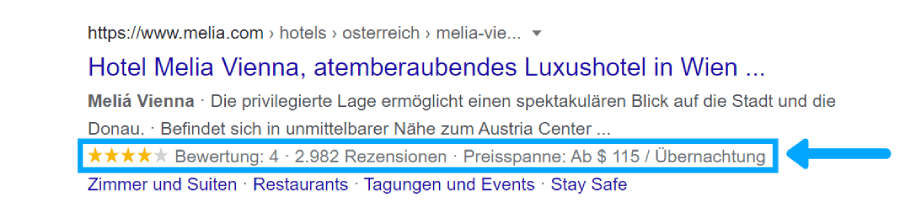
This information can be added using structured data. It's best to use the standardized format provided by Schema.org. This offers markup options that allow the data to be inserted into the source code and read by the search engine.
Where do I enter the Meta-Description?
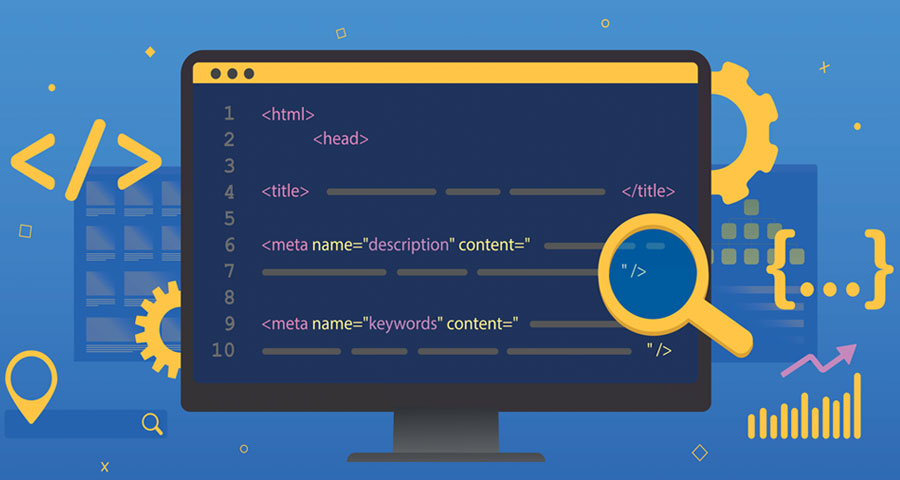
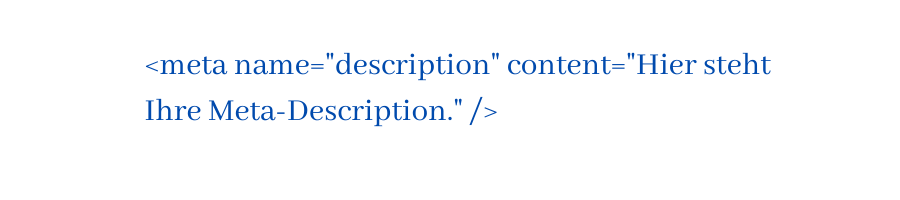
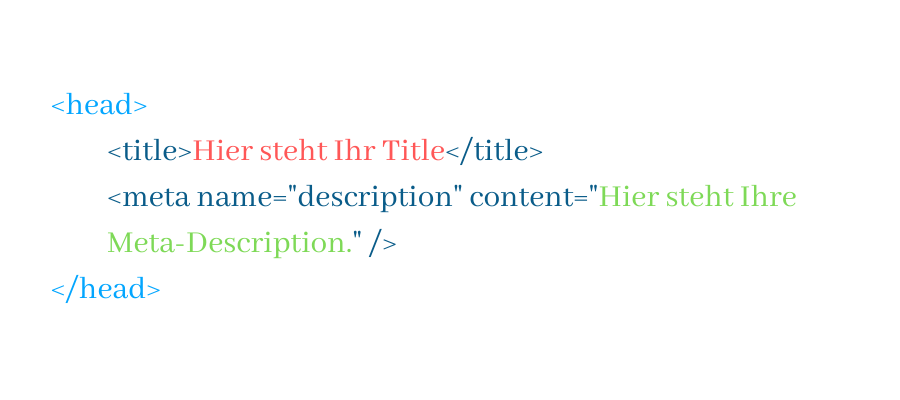
The Meta-Description is inserted into the head section of the HTML source code (under the title tag) for static pages. The attributes "name" and "content" must be included.
The code looks like this in the text editor and can be entered separately for each subpage:
Save the document and upload it to the directory of the website. The Description should then be displayed by Google within a few days.
It often happens that Google does not use the set SEO Description if it hasn't been set manually. Especially for Long-Tail keywords, Google often generates the description automatically from a text passage found on the page. This is usually caused by the entered search term not being present in the description.
The search engine then selects a text that contains the keyword because it assumes that this content better matches the search query. For longer search terms or pages with many keywords, it may be advisable not to create a custom Meta-Description and let Google decide.
TIP: When your page is shared on social media, the first few lines of text may be used as the description. As this text passage often doesn't summarize the content well, it's better to set a description manually.
For pages organized through a Content Management System, the Meta-Description can be entered directly in the backend.
Preview your Meta-Description
Before publishing, make sure to check how the description will appear in the search results and how it will visually affect users. You can use a so-called Meta-Description Tool, like our SERP Snippet Meta-Generator, to do this.
The Meta Title
Directly above the Meta-Description is the title tag, which appears as the blue link in the search results. It is also part of the Google Snippet and must be treated as part of content marketing.
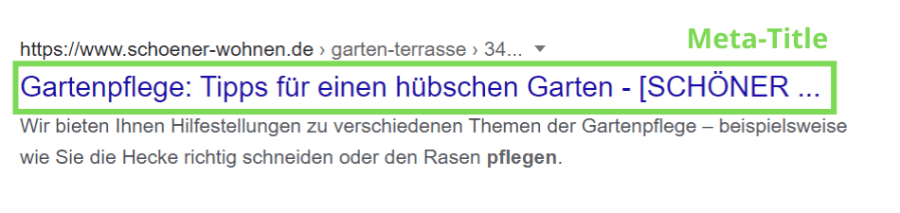
Just like the Meta-Description, the title is inserted into the head section of the HTML document. The code is located above the description:
The title should not exceed 60 characters in length, as it will be truncated with three dots otherwise. On mobile devices, the length is further limited.
Important keywords and call-to-actions should be placed at the beginning of the title as Google considers it an important ranking signal. However, if the keyword cannot fit there, it can be placed further back for the sake of readability.
Align the title's content with your H1 heading. Users expect to find something familiar after clicking on the snippet. In general, the title, H1 heading, and Meta-Description should always work together coherently in terms of content.
Tips for Optimizing the Meta Title
- Include a call-to-action in the title, such as "Order Product Name Now!" or "Book Hotel + Name Now!".
- Place the date in square brackets in the title. This indicates freshness and attracts particular attention.
- If you have a physical location, be sure to mention the location or region in your title. For businesses, include the brand or business name.
- You can also use power words like "affordable" or "free" in the title.
- Clearly and concisely communicate what the user can expect on the webpage. You should be able to summarize the content in one sentence.
Conclusion
The meta-data, consisting of the Meta-Description and Title, is the first thing your users see before they land on your page. This is where users decide whether to explore your site further or not. Therefore, you should consider optimizing the Meta-Description as an important part of content marketing. With relatively little effort, you can achieve significant impact.
By following our guide, creating a great Meta-Description becomes a breeze, and you can expect a significant increase in visitors to your website.
Stay up to date with us: Our articles are continually expanded and regularly updated.