
Improving Bounce Rate 2022:
Here's How!
Klaus Huber
16.06, 2021
Is your conversion rate continuously declining, despite your efforts to optimize your website?
Then your bounce rate might be too high. This means that visitors come to your site and leave immediately without further exploration.
But no reason to panic: In our article, we will show you how to fully convince your visitors and thus reduce the bounce rate on your website.
What is the Bounce Rate?
Imagine you run a store in a shopping street. Customers enter briefly and leave after 5 seconds, without looking around or browsing, let alone making a purchase.
The first impression was enough to drive away the visitors.
This is similar to the bounce rate. This term refers to the percentage of internet users who visit a website and immediately return to the search results page without taking any action. In other words, visitors enter through the virtual shop door before interacting with the page.
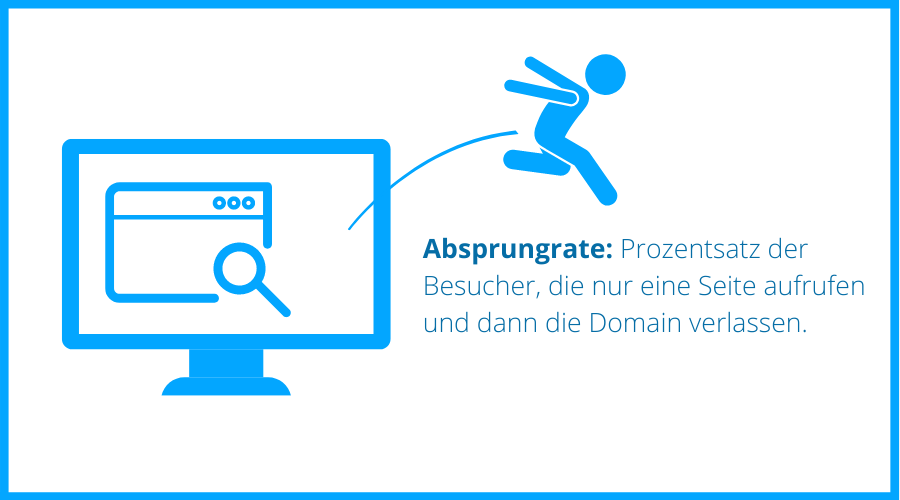
Simplified: If a website receives 1000 visitors within a month, and 600 of them return to the search results page or close the window right after loading the page, the bounce rate is 60 percent.
Bounce Rate vs. Exit Rate
Bounce rate and exit rate are often used interchangeably, but they indicate different things.
While the bounce rate indicates how many visitors leave a website without interaction, the exit rate shows how many visitors leave a specific subpage of the website. It doesn't matter how many subpages were visited before.
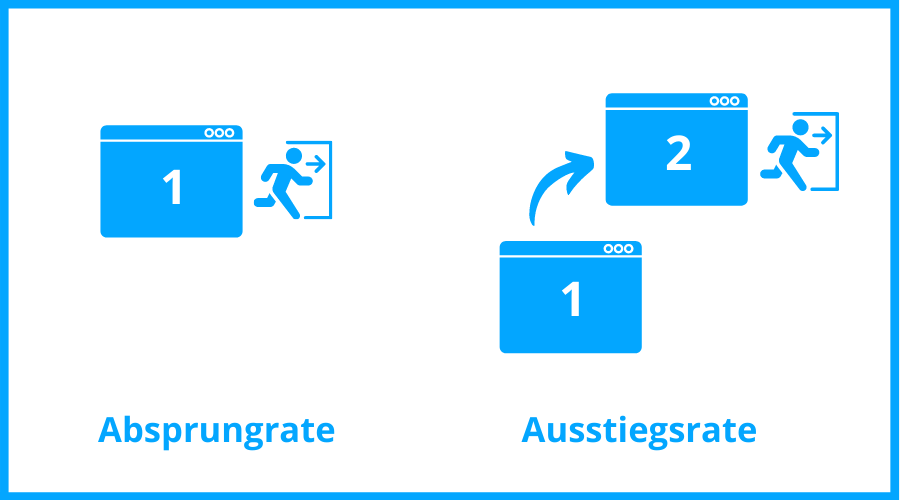
The exit rate should not be overrated since, in the end, every visitor has to leave a website through some subpage.
You should especially keep an eye on a high exit rate on pages with contact forms or other important processes for your website. In such cases, a high exit rate may indicate usability issues.
How to Check Your Website's Bounce Rate
To view your bounce rate, you need to sign in to Google Analytics first. There, under various other metrics, you will find the "Audience Overview" tab and the "Behavior" option. From there, you can see the bounce rate of your website and the individual subpages.
TIP: You can also make a settings change in Google Analytics, so that the bounce rate only includes users who spend less than 10 seconds on the page.
Is a High Bounce Rate a Bad Sign?
A high bounce rate doesn't necessarily have to be bad. It always depends on the type of website you operate. For instance, a one-pager, an internet presence with only a single page, logically has a very high bounce rate.
Also, blogs usually have a high bounce rate since many visitors only briefly visit the site to check if a new article is online. Even if someone reads the article entirely and then leaves the website, it will be counted as a bounce (unless they click on further links).
A high bounce rate can also indicate that the user quickly found the information they were seeking. This is the case, for example, with purely informational pages, such as online dictionaries or contact pages.
However, if the goal of your site is to have users visit many subpages (e.g., online shops), then a high bounce rate may indicate that you are not attracting the right visitors.
We will show you how to reduce the bounce rate on your website and at the same time, significantly increase your chances of conversions.
How to Reduce Your Bounce Rate
When the bounce rate is too high, it is usually not just due to one factor but to several criteria that interact. We have listed the most important points for you to improve your bounce rate.
High-Quality Content
The importance of high-quality content for SEO has been emphasized for years. Relevant content is crucial to keep users on your website longer and provide them with more information about your topic.
What does relevant content mean? It refers to content that provides users with the maximum value in terms of information on a specific topic.
So, answer all the questions your users and potential customers might have with your content and present this information in a way that the visitor can find it quickly and in a comprehensible form.
TIP: To learn how to identify all the necessary questions and create a user-centric text, you can read our article about search intent.
Internal Linking
Internal linking is meant to offer your users as much information as possible. Clicking on the links generates interactions on your site, which can significantly reduce the bounce rate.
However, make sure that the page opens in a new tab - it is less cumbersome for the user (as they don't have to go back) and improves the user experience.
TIP: You can insert internal links in the body text or between paragraphs as recommendations.
Visual Elements
Visual elements such as images and videos are easy to consume and are often viewed because our eyes can focus on them. If you have such elements on your website, the chances are higher that users will stay there longer.
TIP: You don't have to be an expert to produce videos. Often, a screen recording of your website with accompanying audio (e.g., as an explanatory video) is sufficient. The idea is to engage multiple senses.
Readability of Texts
We read differently online than offline. Most internet users do not bother to read the entire text on a page; they scan it instead.
Long, unorganized text blocks will discourage many users at first glance and are often the reason why many visitors bounce off a website.
However, it's not just long text passages; poor formatting can also drive your users away faster than you'd like:
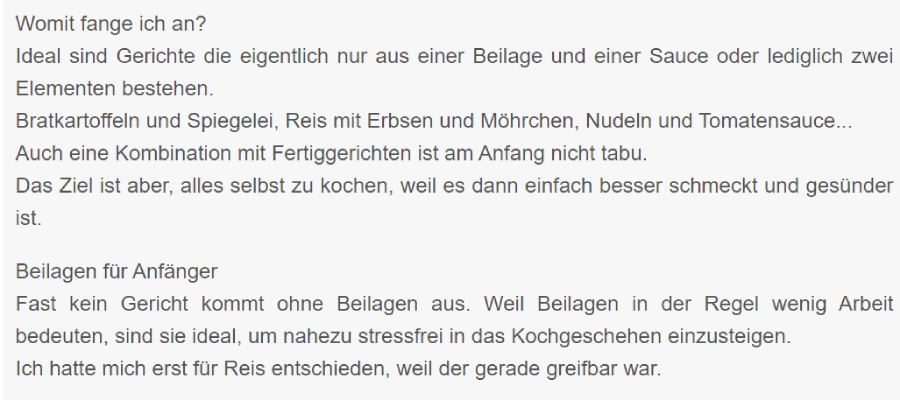
A text like this is more likely to induce yawns than encourage further reading. The text structure is too disorganized and lacks elements to break the monotony, and there are no bolded subheadings.
To make it as easy as possible for your readers to absorb your content, you must also make it clear and structured:
- Write in short sentences.
- Keep paragraphs short and leave enough white space between them (relaxes the eyes).
- Be moderate with foreign words and technical jargon.
- Bold important terms.
- Use anchor links.
- Use an easily readable font with sufficient contrast to the background.
- Utilize bullet points and list elements.
- Create meaningful subheadings (they should accurately reflect the content of the paragraph).
- Include a clear table of contents.
Loading Times
As a rule, users are impatient and are not willing to wait for more than 3 seconds for a page to load. If the page takes too long to load, they will quickly jump to the competition. Therefore, it's crucial to optimize the loading times of your site so that all content is displayed to users in the shortest time possible.
TIP: The tool PageSpeed Insights helps you improve the loading times of your website.
To minimize the loading time of your website, you can compress your images or reduce the size of stylesheet and script files.
User Interface and User Experience
Internet users expect a website to be easy and intuitive to use. Intuitive means that standard functions such as the search function or shopping cart are always located in the same place on a website. Anything else can only confuse the user and lead to them bouncing off the page.
Very important: Embrace simplicity! Never overload your website with information and clickable elements:
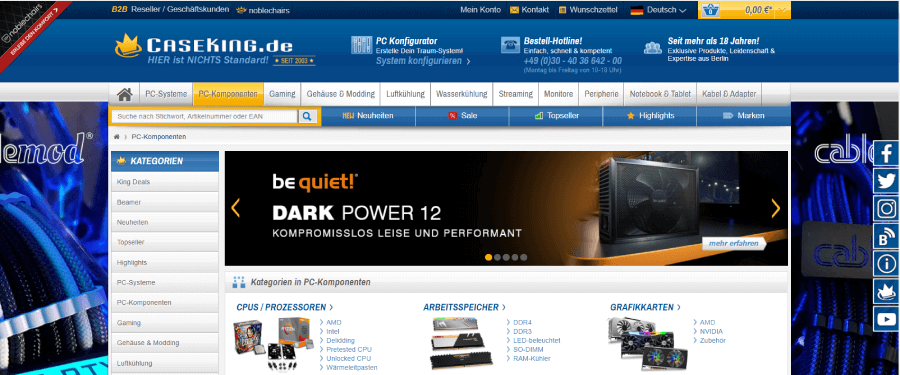
Too many ads, numerous menu items, and a slider on the homepage. This website is simply overloaded.
Less is definitely more when it comes to content design. Reduce the menu items and use enough whitespace between lines to allow the eyes to rest - like here:

Focus on providing an accurate and specific description in the navigation bar and concentrate on the essential functions and sub-items in the menu.
Avoid Disturbing Pop-ups
In marketing, we often rely on advertisements, but intrusive pop-ups that cover the visible area are more likely to scare off your users than benefit you. So, use these elements sparingly.
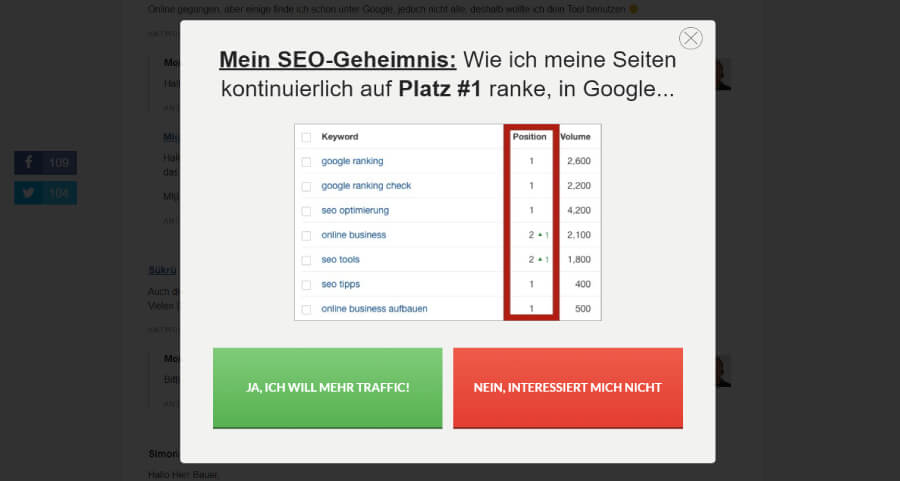
Such pop-ups usually cover the entire screen and lead many visitors to leave the page immediately because their reading flow is interrupted. Some of these ads even contain slightly provocative statements, which further negatively affect the user experience.
TIP: Replace pop-ups with well-placed call-to-actions; they are less intrusive and have a significantly more positive effect on the user experience.
By the way, sliders on the homepage (images that change after a few seconds) have a similar negative effect. While they were trendy a few years ago, they are now an absolute no-go. Users don't want to wait for several seconds to see the information they are looking for.
Keywords
Make sure to incorporate relevant keywords into your content. Long-tail keywords are often more lucrative since searchers already know exactly what they want.
While using long-tail keywords may attract fewer visitors overall, those who come will stay on the page longer and are more likely to perform a conversion.
TIP: Check out our article on SEO text creation. We have summarized all the essential information about using keywords there.
By selecting the right keywords for your topic, you also ensure that you attract the right audience. We've already shown you how to define your potential customers in our Buyer Persona article.
Engage with Storytelling
We humans love stories because they appeal to us on an emotional level and enable us to identify with the brand.
So, package your offer into a story and tell, for example, about the obstacles you had to overcome to lead your company to success. Also, telling stories about visions and goals for the future resonates well with customers.

Big brands thrive on storytelling: IKEA turns its customers into everyday heroes through storytelling and skillfully presents its products.
Mobile Optimization
Is your website displayed perfectly on mobile devices? Numerous visitors access your website through mobile devices. Ensure that your online presence can be optimally displayed on smartphones and tablets with Responsive Design.
TIP: Use the Mobile Friendly Test Tool to check how your site performs on mobile devices.
Maintained Website
By a maintained website, we mean that there should not be too many (ideally none) dead links or broken images on your site. If there are 404 error pages, it's best to include a redirect. In general, you should ensure that your website is well programmed and functions flawlessly.
Check Meta Data
You can also reduce your bounce rate by optimizing meta data such as title and description. These should match the content on the webpage and not mislead users. If a user cannot find the promised information, they will quickly search for another website.
Make sure that titles and descriptions are not too long, yet still convey the essential information about the website. Don't hesitate to add a call-to-action to the description as well.
TIP: If you want to know how to create such a meta description, take a look at our Meta Description Generator.
Build Trust
To build trust with your users, you need not only certificates and awards, but also correct spelling and a professional design. If the first sentences contain numerous typos, users will see it as a sign that you don't care about your website.
TIP: Always have your texts proofread and avoid using overly bright colors and blinking banners in your design.
Use A/B Testing
Don't hesitate to test changes to your website using an A/B test. In this test, two versions of the page are put online, and it's checked which one achieves the best results. This allows you to effectively evaluate optimization measures. Ideally, you should conduct such tests regularly.
Improving Bounce Rate for Online Shops
Especially for online shops, it is vital that customers visit multiple subpages. This indicates that they are gathering more information about a product and are interested in making a purchase.
We have compiled the most important factors for reducing the bounce rate, specifically for online shops.
Product Filtering
Complexity scares users away. Allow your customers to narrow down products by using filters (e.g., sort by color). This gives your users a better overview and helps them find what they are looking for more quickly. This feature is essential, especially for a large selection of products.
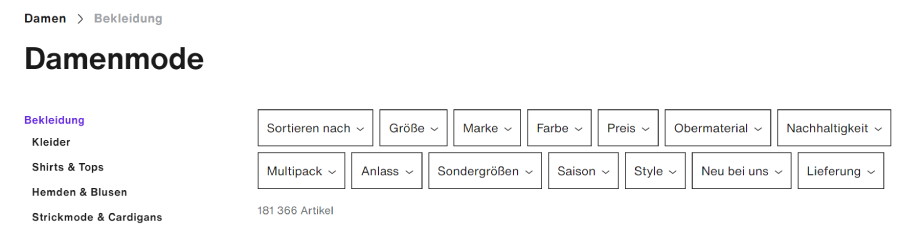
Wholesaler Zalando sets an example: Products can be filtered by meaningful categories, allowing customers to start specific searches.
Remember the so-called choice overload effect: Too many options overwhelm users, causing them to make no decision and not buy anything. Read more about it in our article on sales psychology for websites.
Consistency between Ad and Landing Page
Of course, your landing page should exactly reflect the offer that you advertise in your ad. A customer who doesn't find what was promised to them will quickly feel deceived and bounce off to a competitor's site.
If your ad promises "Running shoes for under 50 Euros" and there isn't a single pair under a hundred Euros on the website, you will lose the customer's trust, and they will look for another store immediately.
If your content is perfectly tailored to your customers' needs and yet your bounce rate keeps increasing, you may not have communicated your offer properly. Describe exactly what the user can expect in your headline and reflect it in your title image. The best offer won't help if it doesn't resonate with your customers.
Trust Symbols
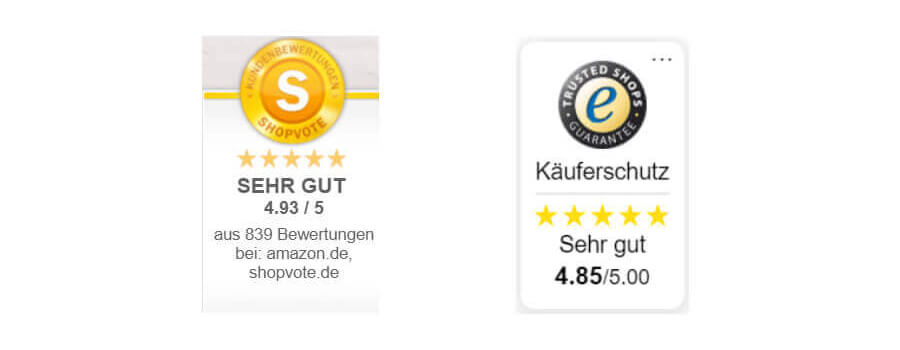
Especially for higher price segments, customers tend to be more hesitant to make a purchase. Make sure that there are enough trust symbols in the form of certificates, quality seals, or customer reviews visible on your website.
The quality seal from Trusted Shops is particularly trustworthy. You can request certification through the company's website.
Including your contact information in an easily accessible manner and highlighting service features will also add to the trust factor. Customers will feel much more comfortable when they have the option to seek advice. Alternatively, you can provide an extensive FAQ page.
Many websites and shops now offer the option of a live chat with real employees. Consider whether you can incorporate such a feature on your site.
Payment Methods
Every visitor prefers a different payment method, so offering as many payment options as possible increases your chances of retaining customers on the site.
TIP: Also consider country- and region-specific payment methods and automatic conversion into the local currency.
No Unnecessary Input Fields
Every click is one click too many. Your users want to be able to interact with the website as simply and quickly as possible. Avoid unnecessary input fields (e.g., asking for company details for primarily private customers) as much as possible.
Clear CTAs (Call-to-Action)
One of the reasons why many users bounce off a page is because they don't know what to do next. That's why a call-to-action button should not only be visually emphasized but also clearly describe where it leads.
Guest Checkout Option
A common reason why users don't complete a purchase is that they don't want to go through the (sometimes lengthy) registration process. So, allow guest checkouts as well. This will cater to customers who want to make a spontaneous purchase without the need to create an account.
Fazit
In this article, we have summarized several factors that influence the bounce rate of a website and that you should consider when optimizing your site.
The bounce rate is one of the most important indicators of a website's success, as it can provide information on whether the quality of your site may be insufficient for your users.
So, by building your online presence in a way that makes it easy to consume and allows users to find all important information quickly, you are not only benefiting yourself but also your users.